


Page 386 - Furniture Cabinetry Hardware-FloorKitchenResource.com
P. 386
Office Organization
            Power and Charging


             Powerdock


                                                    1        1                        2           2                     3              3


                                                                                                         Press         Press
                                                                                                         to release    to release
                                                  To use the Pop-up Socket, gently lift up the   Press the master switch on. A green light   Insert Sensiopod into the hole to discreetly
                                                               To use the Pop-up socket, gently
                                                                                         Press the master switch on.
                                                           To use the Pop-up Socket, gently lift up the
                                                                                                Press the master switch on. A green light
                                                                                                                                     Insert Sensiopod into the hole to discreetly
                                                  silver handle on the top cover until all socket  confirms that power is available. You can use  hide away when not in use.
                                                               lift up the handle on the top cover
                                                                                         A green light confirms that the
                                                                                                confirms that power is available. You can use
                                                           silver handle on the top cover until all socket
                                                                                                                                     hide away when not in use.
                                                  outlets are exposed and the green stop/release all power sockets. The unit can be retracted
                                                                                         power is available. You can use
                                                               until all socket outlets are exposed
                                                           outlets are exposed and the green stop/release all power sockets. The unit can be retracted
                                                  button clicks and locks the unit in place.     in position by pressing the green stop/release
                                                               and the green stop/release button
                                                                                         all power sockets. The unit can be
                                                                                                in position by pressing the green stop/release
                                                           button clicks and locks the unit in place.
     5                                                         clicks and locks in place.  button and pushing the unit down until it’s
                                                                                         retracted in position by pressing
                                                                                                button and pushing the unit down until it’s
                                                                                    flush with the surface, leaving the engaged
                                                                                         the green stop/release button and
                                                                                                flush with the surface, leaving the engaged
                                                                                    cables on the window of the top cover.
                                                                                         pushing the unit down until it’s
                                                                                                cables on the window of the top cover.
                                                                                         flush with the surface, leaving the
                                                                                         engaged cables on the window of
          Office Organization                Press                                       Insert SensioPod into the hole
 1                       2                                  3                            the top cover.
                                                                                         to discreetly hide away when
                                             to release
 To use the Pop-up Socket, gently lift up the   Press the master switch on. A green light   Insert Sensiopod into the hole to discreetly not in use.
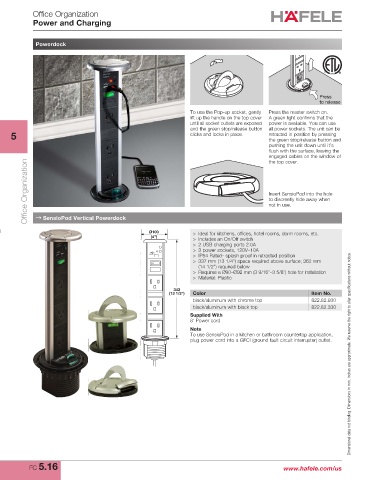
             → SensioPod Vertical Powerdock
 silver handle on the top cover until all socket  confirms that power is available. You can use  hide away when not in use.
 outlets are exposed and the green stop/release all power sockets. The unit can be retracted
 button clicks and locks the unit in place.     in position by pressing the green stop/release   >  Ideal for kitchens, offices, hotel rooms, dorm rooms, etc.
                                                  Ø100
                       button and pushing the unit down until it’s   >  Includes an On/Off switch
                                                  (4”)
                       flush with the surface, leaving the engaged   >  2 USB charging ports 2.0A
                       cables on the window of the top cover.   >  3 power sockets, 120V–10A
                                                                >  IP54 Rated- splash proof in retracted position
                                                                >  337 mm (13 1/4") space required above surface; 362 mm
                                                                  (14 1/2") required below
                                                                >  Requires a Ø90–Ø92 mm (3 9/16"–3 5/8") hole for installation
                                                                >  Material: Plastic
                                                          343
                                                        (13 1/2")  Color                               Item No.
                                                                black/aluminum with chrome top         822.82.930
                                                                black/aluminum with black top          822.82.330
                                                               Supplied With
                                                               8' Power cord
                                                               Note
                                                               To use SensioPod in a kitchen or bathroom countertop application,
                                                               plug power cord into a GFCI (ground fault circuit interrupter) outlet. Dimensional data not binding. Dimensions in mm, inches are approximate. We reserve the right to alter specifications without notice.


           FC 5.16                                                                            www.hafele.com/us

